To make an automated Instant EFT payment do the following:
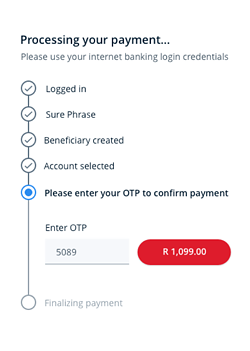
1. The buyer selects their bank and logs in using their online banking credentials.
2. Next they choose from which account they will be making the payment.
3. Buyers then verify the payment with their bank on their mobile device.
4. The payment is processed and instantly reflects in your PayFast account.
- When you are ready to checkout, you will be redirected to PayFast’s secure payments page.
- Click the Instant EFT payment method.
- Once Instant EFT has been selected, you will be prompted to choose your bank and enter your internet banking credentials.
- Next, you will select the bank account from which the payment should be made and click the pay button to generate the Instant EFT payment.
- To complete the transaction, you will need to confirm the payment with a one time pin or by approving a mobile authentication message sent from your bank.
- A payment notification is sent as soon as the EFT has been verified. This happens instantly, so there is no delay or waiting period between you paying and the merchant receiving the funds.