Renewing ROS digital Certificate, you are required to have a renewal of the digital certificate probably every two years. This is important in the sense that, when your certificate become out of date, you will loose all your access to ROS ONLINE SERVICES which might be devastating until you get a new certificate.
To renew your ROS certificate, you need to log onto the ROS Portal.
Checking to see if your certificate is about to expire, you can refer to the profile tab of your certificate.
NB: All certificate that falls within two weeks to expiry, the system gives email notices to prompt their users to start their renewal process.
To catch up with this, check your mails most often.
ADMINISTRATORS RENEWAL PROCESS
Below are the procedures to renew your certificate as administrator.
- Consider updating your security questions in the ROS Profile tab. This will ensure that you can answer them correctly, to obtain a new certificate quickly if necessary.
- Check your contact details in the ROS Profile tab to ensure that you receive email notifications to renew your certificate. Check your sub-user contact details in the ROS Admin Services tab.
- Consider whether you use your certificate in a software package, for example a payroll reporting package. You need to re-import the renewed certificate into your package. Plan the renewal to allow time to update the package and test the package after renewing.
- For further assistance, please refer to the guide:
Timing of renewal
You can obtain a new ROS Administrator digital certificate at any time by resetting your ROS login. If you reset your login, you obtain a new certificate with the maximum available lifespan – up to two years. You can reset your ROS login if you:
- are having difficulty renewing your certificate
- have lost your certificate or password
- have allowed your certificate to expire.
The ROS Administrator can issue a new sub-user certificate, to replace a certificate due to expire if:
- you or the sub-user are having issues renewing the sub-cert
- you wish to avoid renewing a sub-user certificate.
Both certificates can be active simultaneously, allowing you update a software package without loss of service.
How to renew your certificate
Follow below steps to renew your ROS certificate:
- Login to ROS – the certificate renewal screen will appear.
- Enter your ‘Old Password’ (this is the one you have been using to log into ROS up to now).
- eight characters
- one upper case character
- one lower case character
- one digit.
- Retype your new password at ‘Confirm Password’.
- Click ‘Renew Now’.
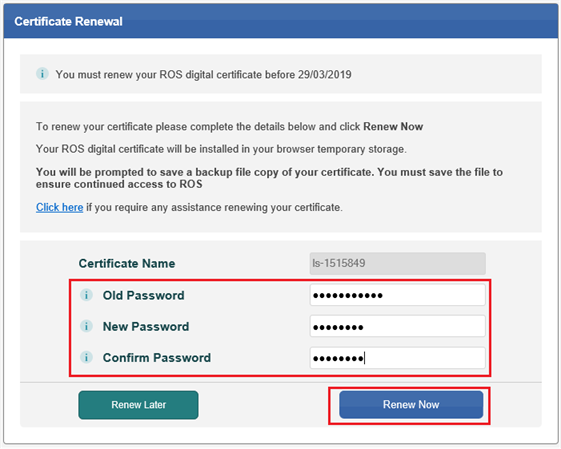
A new digital certificate will be created in your web browser. It will have the same name as the old certificate, but will have the new password.
Note
You must SAVE your renewed certificate and keep it secure, to ensure access to ROS in the future. For more information please see Save your digital certificate.
Any copies of the certificate that you saved before the renewal will be invalid.