GeekySports is a website devoted to the latest news, drama, and happenings in geek related sporting contests. Want to find out if your team won the Segway Polo world Cup? Did Carlos “the bruiser” take back the title in Extreme Ironing? Will the Twin Cities Quidditch club settle their rivalry with the Michigan State team? GeekySports is the place to go.
That being said, after the launch of a new custom content feature on their site, GeekySports had been noticing a significant performance issue in production. Their setup is using a load balancer with CDN turned on, serving content from a backend which optimizes images and data.
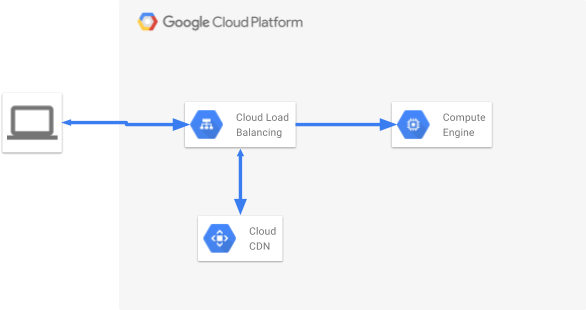
This all seems like the right setup, however their team reached out after seeing a massive “cache fill” costs in their Cloud bill, coupled with reports from end users that the websites aren’t getting any faster, despite multiple reloads, or high volume of accessed content.
All signs point to a problem with CDN caching, so let’s dig in.https://cdn.embedly.com/widgets/media.html?src=https%3A%2F%2Fwww.youtube.com%2Fembed%2Fvideoseries%3Flist%3DPLIivdWyY5sqK5zce0-fd1Vam7oPY-s_8X%26start%3D2&url=http%3A%2F%2Fwww.youtube.com%2Fwatch%3Fv%3DKXaINUmvpFc&image=https%3A%2F%2Fi.ytimg.com%2Fvi%2FKXaINUmvpFc%2Fhqdefault.jpg&key=a19fcc184b9711e1b4764040d3dc5c07&type=text%2Fhtml&schema=youtube
Cached or not : the new sports craze.
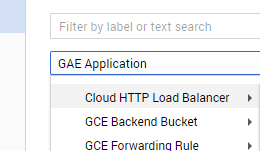
We can check out how our load balancer is performing, with respect to caching, by bringing up the logging information for the HTTP load balancer of choice in the cloud console:
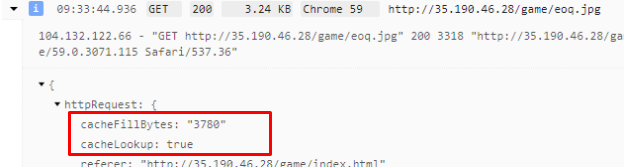
Each request that’s logged will have information detailing if it properly had a cache hit or not. For example, we can see the first requests results in a lookup, a failure, and a fill
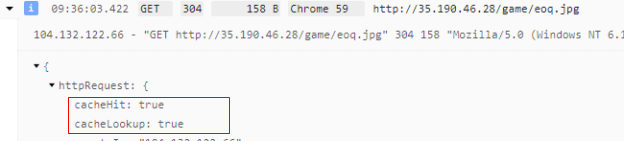
Our 2nd request to the same resource results in a hit:
So now we know how to validate that something has been cached through the load balancer. Looking at all the logs for GeekySports we can see that the number of cache hit entries is really low for their traffic during the day.
This is a problem, since it means that there’s a lot of assets being filled into the CDN, but not a lot of re-use from it.
Sanity check : the right headers
First off, let’s make sure that the responses can be cached (Not all HTTP responses are cacheable) A response can be stored in Cloud CDN caches only if all of the following are true:
- It was served by a backend service or backend bucket with Cloud CDN enabled.
- It was a response to a GET request.
- The status code was 200, 203, 300, 301, 302, 307, or 410.
- It has either a Content-Length header or a Transfer-Encoding header.
- It has a Cache-Control: public header.
- It has a Cache-Control: s-maxage, Cache-Control: max-age, or Expires header.
We can look at the request/response in chrome dev tools (or cURL) and validate that everything seems to be working properly here when requesting one of the assets from their website.
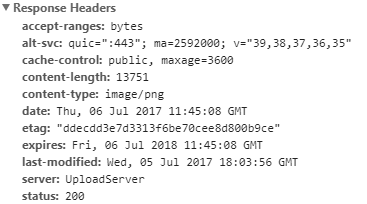
So, the HTTP response headers have all the proper requirements to be cached, yet we’re still seeing a caching problem at the CDN level.
How CDN cache keys work
At their core, CDNs are really just massively distributed hash tables. URLs are hashed to some key value, and the CDN can then determine if it’s in their caches, and on what machines it’s cached on. In Google’s case, elements in the Cloud CDN cache are identified by a cache key.
When a request comes into the cache, the cache converts the URI of the request into a cache key, then compares it with keys of cached entries. If it finds a match, the cache returns the object associated with that key.
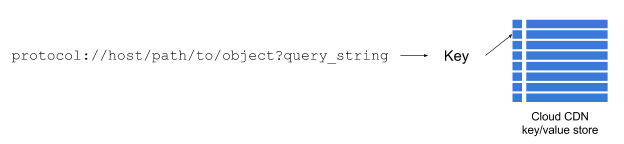
By default, Cloud CDN uses the complete request URI as the cache key. For example, https://example.com/images/cat.jpg is the complete URI for a particular request for the cat.jpg object. This string is used as the default cache key. Only requests with this exact string match.
For example, the following would not match:
- https://example.com/images/cat.jpg (https vs http)
- http://example.com/images/cat.jpg?user=user1 (query string)
The first one is interesting, because it means assets coming through HTTPS will not be cached as identical objects as coming through HTTP. (but dealing with that is the topic for a separate post)
The last one is important for this scenario. Looking back at the actual request. We can quickly see the problem; GeekySports is passing the user token as a url param, which, according to the above value, causes it to not be cached.
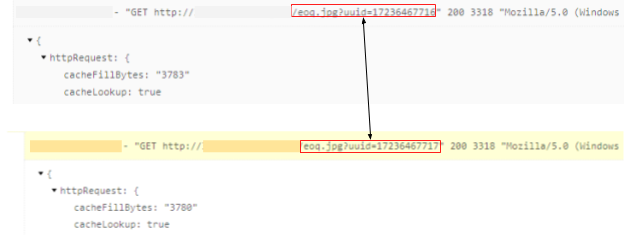
The result with GeekySports is that each user was causing each asset to be cached in the CDN individually
Custom cache keys
To fix this, we need to leverage custom cache keys, which allow us to modify how the cache key is generated by omitting/ including specific portions of our URL:
- Protocol: You can omit the protocol from the key. If you omit the protocol, then a request for https://example.com/images/cat.jpg receives a cache key of example.com/images/cat.jpg. After that, requests for both https://example.com/images/cat.jpg and http://example.com/images/cat.jpg count as matches for that cache entry.
- Host: You can omit the host from the key. If you omit the host, then requests for example.com and example2.com can both match the same cache entry. A request for https://example.com/images/cat.jpg followed by a request for https://example2.com/images/cat.jpg results in a cache hit for the second request.
- Query string: You can omit the query string from the cache key. If you omit the query string, then a request for https://example.com/images/cat.jpg?user=user1 receives a cache key of https://example.com/images/cat.jpg, so https://example.com/images/cat.jpg?user=user1 and https://example.com/images/cat.jpg?user=user2 can both match the same entry. You can also selectively omit or include portions of the query string.
For Geekysports, the fix is clear. If we set up our cache keys to ignore the query string for users, then we should end up caching assets properly.
The fix is in!
Now, we can see that regardless of the query string, the hit is the same:

We can also see how our caching hits trend over time by using the “CACHED RESPONSES” chart in stack driver.
What’s important to note is that this change had not only a massive improvement in performance for the users of GeekySports but it also had a huge price reduction since assets were no longer being cached as single users.